6.3.2 Installing the Ethernet Port Arrester
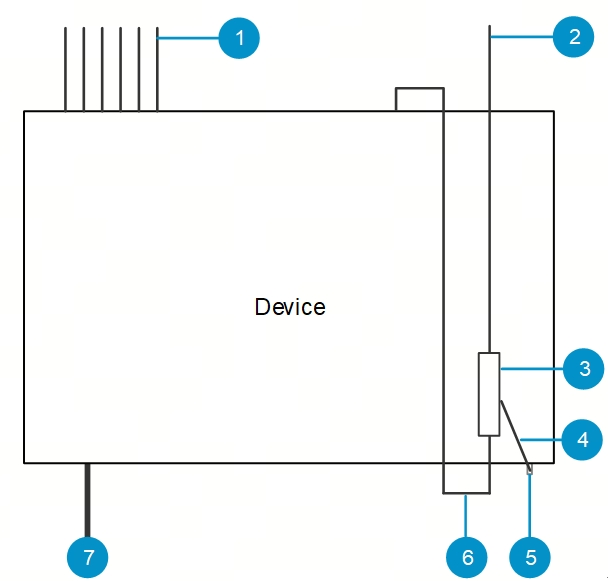
Connect an Ethernet port arrester to the switch to prevent the damage by lightning before connecting an outdoor network cable to the switch.
Tools
Phillips screwdrivers or flat-head screwdriver, multimeter, and diagonal pliers.
Installation Steps
(1) Tear one side of the protective paper for the double-sided adhesive tape and paste the tape to the enclosure of the Ethernet port arrester.
(2) Tear the other side of the protective paper for the double-sided adhesive tape and paste the Ethernet port arrester to the switch enclosure. The paste position for the Ethernet port arrester should be as close to the grounding terminal of the switch as possible. over any of its shares arising under its Articles of Association.
(3) According to the distance between the switch grounding terminal and the Ethernet port arrester, cut the grounding cable for the Ethernet port arrester and firmly crimp the grounding cable to the grounding terminal of the switch.
(4) Use a multimeter to check whether the grounding cable for the arrester is in good contact with the grounding terminal and the enclosure of the switch.
(5) Connect the arrester by using an adapter cable (note that the external network cable is connected to the IN end, while the adapter cable connected to the switch is connected to the OUT end) and check whether the service module LED is normal.
(6) Use a nylon cable tie to bind the power cords.
Figure6-5 Installing an Ethernet Port Lightning Arrester
|
No. |
Description |
|
1 |
Ethernet cable for indoor connection |
|
2 |
Ethernet cable connected to the outdoor |
|
3 |
RJ45 port arrester (pasted on the enclosure) |
|
4 |
Ground cable of the arrester |
|
5 |
Grounding lug of the equipment |
|
6 |
RJ45 port adapter cable |
|
7 |
Power input |